![TradeTrax logo dark.png]](https://kbase.tradetrax.com/hs-fs/hubfs/TradeTrax%20logo%20dark.png?height=40&name=TradeTrax%20logo%20dark.png)
What are Tasks?
Tasks are the individual scopes of work needed to complete a Job, like pour slab, frame, deliver drywall, install countertops, etc.
-
Task Name
-
Job Address and Lot Number
-
Task's Expected Start Date
-
Definition of Ready- the preceding tasks that have to be completed before that task can be started. The fraction on the right side of the task represents how many tasks are in the DOR and how many are complete.
-
Task Status - Current state of a Task's progress: Not Started, Checked-In, In Progress, Completed
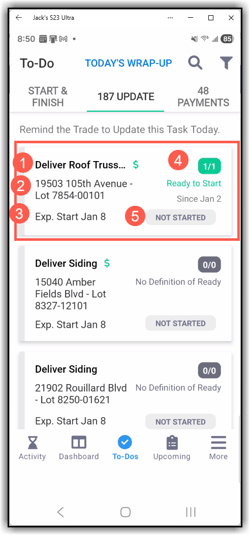
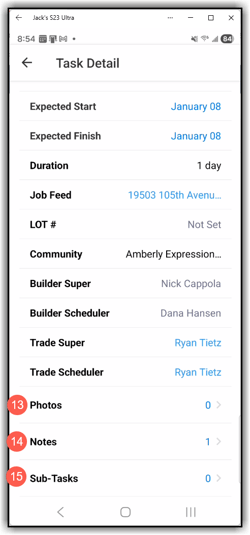
Tap the task to open more task details
-
(1)Task name (2)Trade the task is assigned to (3)Task Status (4)Expected start and finish dates (5)Task Duration (6) Job feed-tap to open (7)Lot # (8)Community name (9)Builder Super (10)Builder Scheduler (11)Trade Super (12)Trade Scheduler (13)Photos-Tap to add images (14) Notes-Tap to add notes (15) Subtasks
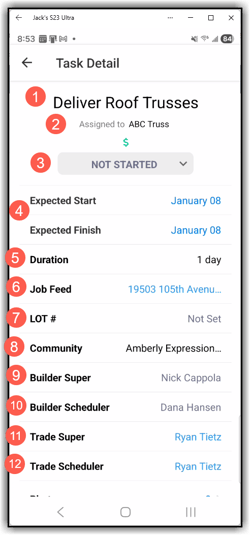
-
Tap Job Feed to open the Job Feed section
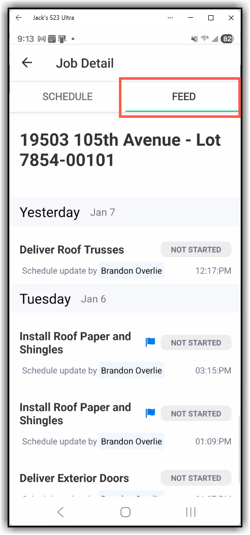
- Feed- Task activity feed
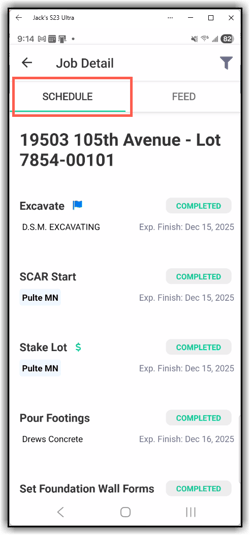
- Schedule-Chronological order of all the job tasks, Trade assigned to the task, and the task's current status current status